- Help
- Core Concepts
New Term Structure Guide
Understanding Spark’s New Organizational Structure
Released in June, 2026
Spark recently launched a new organizational structure designed to give schools, co-ops, and microschools more flexibility in how they manage academic records, programs, and scheduling.
This update introduced new ways to organize your school while preserving the workflows you already use.
Why We Made This Change
Before the update, Terms served as Spark’s primary organizational layer. Many schools used Terms for a variety of purposes, such as:
- Academic years (2025–2026)
- Semesters or quarters
- Summer programs
- Specialized programs
While this has worked well, it can become limiting—especially for schools managing multiple programs or trying to organize several sessions under one larger structure.
To solve this, Spark’s release added new organizational layers above Terms (now Sessions) to make your structure more flexible and scalable.
A Overview of the New Structure
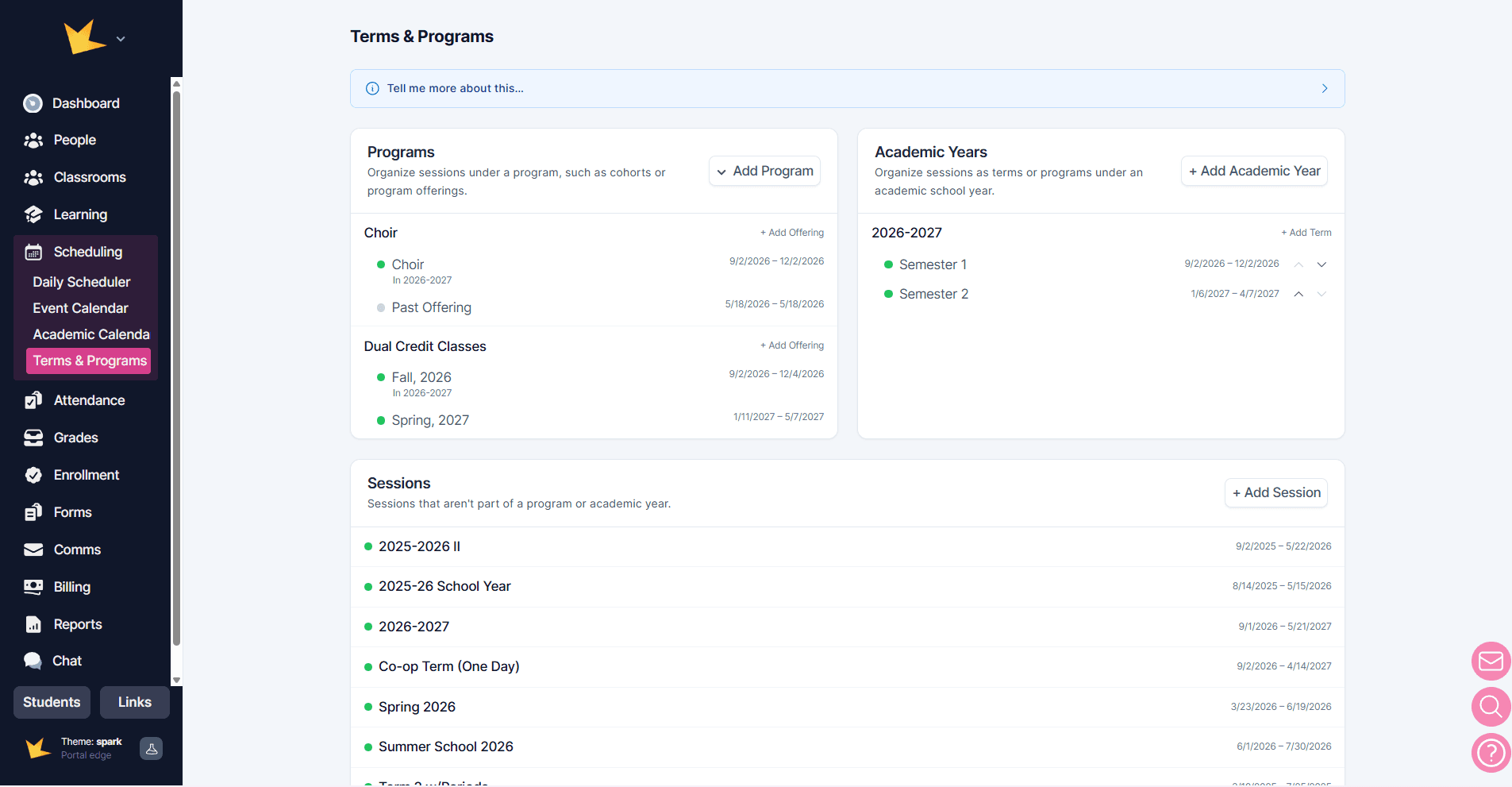
With this release, Spark offers two main organizational layers: Sessions and Programs/Academic Years.
1. Sessions
Sessions are the new direct replacement for Terms. In a Session, you can specify date ranges and day types, just as you did before in the Terms feature.
Examples:
- Fall 2026
- Summer Camp 2026
- Quarter 1
Use standalone Sessions when you simply need to organize records by a date range without grouping them under something larger.
For current Spark users:
Your existing Terms have transitioned into Sessions, and your current workflows will continue working as expected.
2. Programs & Academic Years
Programs and Academic Years are new higher-level organizational layers that are not tied to specific dates. Instead, they act as an umbrella for grouping multiple Sessions together. The individual Sessions contain the actual dates and scheduling details.
In a Program, Sessions are grouped as Program Offerings. Examples include:
- Enrichment Program
- Art Class, Fall 2026
- Music Class, Fall 2026
- STEM Class, Spring 2027
- HVAC Program
- Cohort 1
- Cohort 2
In an Academic Year, Sessions are grouped as Terms. Examples include:
- 2026–2027 Academic Year
- Fall Semester
- Spring Semester
- Summer School
- 2027–2028 Academic Year
- Quarter 1
- Quarter 2
- Quarter 3
- Quarter 4
For current Spark users:
You have the option to move your Sessions (previously Terms) into either a Program or an Academic Year. This can be done at any time, and you are free to experiment with organizing your Sessions.
How Records Are Organized
All information in your Spark platform that is currently organized by Terms has remained intact. Terms have been renamed Sessions, and you have the new option to group those Sessions within a Program or Academic Year.
When you select a Program or Academic Year, Spark will automatically include all Sessions within that group and display all related records across those Sessions. If needed, you can narrow your view further by filtering down to a specific Session.
This applies to records such as:
- Classrooms
- Student Planner Assignments
- Grade records
- Attendance records
- Other academic records tied to a timeframe
Which Option Is Best for Your School?
- Standalone Sessions are best for simple setups with a single date-based structure, such as small microschools, camps, or short-term classes.
- Programs are ideal for schools running multiple independent programs or groupings, such as homeschool co-ops, trade schools, or multi-program schools.
- Academic Years work best for schools organized around yearly cycles with semesters or quarters, such as private schools, microschools, and full-year homeschool co-ops.
Schools can use Programs and Academic Years together, allowing you to organize both your school year and individual programs at the same time.
Schools don’t need to have their entire organizational structure figured out immediately. You can start simple and experiment with the new structure over time. Sessions can easily be reorganized under Programs and/or Academic Years later, giving your school the flexibility to grow and adapt as your needs change.
What This Will Mean for Existing Terms
With this update:
- Your existing Terms have become Sessions
- Your existing records are intact
- Your current workflows continue working
The biggest change will be added flexibility.
You now have the option to group Sessions into Programs or Academic Years whenever it makes sense for your school.
This means you can keep your setup simple—or build a more structured system as your school grows.
Need Help?
Questions about the changes? Reach out to support—we’re happy to help. Email us at hello@sparkschools.co